In a world where the line between home office and corporate workstation continues to blur, choosing the right display has become more than a matter of screen size alone. Professionals, students, and creative hobbyists alike seek monitors that deliver consistent color, comfortable viewing, and reliable build quality—without unnecessary frills. Enter the HP Series 3 Pro 23.8 inch FHD monitor – 324pe, a device that quietly promises to meet these demands. But does it truly stand out in a crowded market of budget-friendly business monitors? This article takes a deep, honest look at every angle of this display, from its physical design to its real-world performance, and helps you decide whether it deserves a place on your desk.
A First Look at the HP Series 3 Pro 23.8 Inch FHD Monitor – 324pe
When HP launched the Series 3 Pro lineup, the goal was clear: offer reliable, everyday productivity monitors for professional environments. The HP Series 3 Pro 23.8 inch FHD monitor – 324pe sits comfortably in the middle of that range. It is neither the cheapest option nor the most feature-packed, but it aims to hit a sweet spot—affordable dependability with a touch of ergonomic refinement.
Unpacking the Design Philosophy
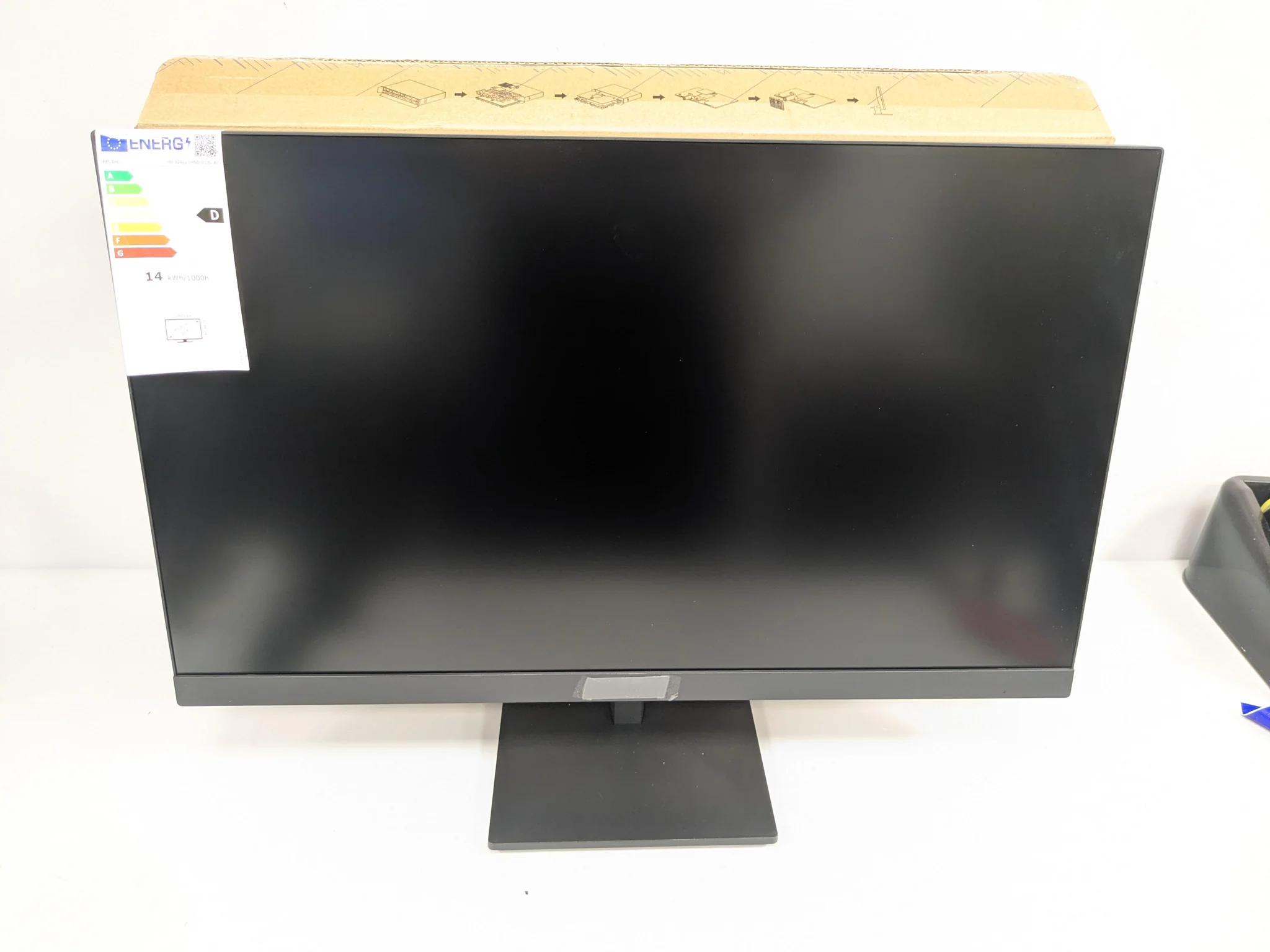
The first thing you notice about this monitor is its understated presence. Unlike gaming monitors with aggressive lines or RGB lighting, the HP Series 3 Pro 23.8 inch FHD monitor – 324pe adopts a clean, utilitarian aesthetic. The bezels are thin on three sides, which helps reduce visual clutter during multi-monitor setups. The bottom bezel houses a small HP logo and a subtle row of OSD (On-Screen Display) buttons.
The stand deserves special mention. It is not the flimsy plastic base found on entry-level monitors. Instead, HP has included a sturdy, metallic-effect stand with full tilt, swivel, pivot, and height adjustment. This level of ergonomic flexibility is rarely seen at this price point. You can rotate the screen into portrait mode—a blessing for coding, document editing, or reading long PDFs.
The rear panel is simple but functional. The connection ports face downward, which helps with cable management. VESA mounting holes (100x100mm) are present, so if you prefer a monitor arm or wall mount, you are not locked into the stock stand.
Technical Specifications Overview
Before diving deeper, let us lay out the core specifications:
| Specification | Detail |
|---|---|
| Screen Size | 23.8 inches |
| Resolution | 1920 x 1080 (Full HD) |
| Panel Type | IPS (In-Plane Switching) |
| Refresh Rate | 75Hz |
| Brightness | 250 nits (typical) |
| Contrast Ratio | 1000:1 |
| Response Time | 5ms (GtG) |
| Color Gamut | 72% NTSC (approx. 99% sRGB) |
| Ports | 1x VGA, 1x HDMI 1.4, 1x DisplayPort 1.2 |
| Ergonomics | Height: 100mm, Tilt: -5° to 20°, Swivel: ±45°, Pivot: 90° |
| VESA Mount | 100 x 100 mm |
These numbers are solid for an office-oriented display. The IPS panel promises wide viewing angles, and the 75Hz refresh rate is a slight step up from the standard 60Hz, offering marginally smoother motion when scrolling or dragging windows.
Display Performance – What the Numbers Mean in Real Life
Spec sheets can only tell half the story. To truly evaluate the HP Series 3 Pro 23.8 inch FHD monitor – 324pe, we need to look at how it performs in daily tasks—writing, spreadsheet work, video conferencing, and light media consumption.
Color Accuracy and Saturation
HP claims 72% NTSC coverage, which roughly translates to 99% of the sRGB color space. For a monitor in this category, that is excellent. sRGB is the standard for most web content, office applications, and even some entry-level photo editing. Colors appear natural rather than oversaturated. Skin tones look realistic, and user interface elements in software like Microsoft Office or Adobe Lightroom (basic adjustments) are rendered without glaring errors.
The monitor is factory-calibrated to a respectable degree. There is no noticeable color shift toward blue or yellow out of the box. However, if you demand strict color accuracy for print design, you would need a dedicated calibration tool. For 95% of office and home users, the default settings are more than sufficient.
Brightness and Anti-Glare Coating
At 250 nits, the HP Series 3 Pro 23.8 inch FHD monitor – 324pe is bright enough for indoor use. It struggles a bit in very sunny rooms with direct window light, but lowering blinds or repositioning the monitor solves the issue. The anti-glare matte coating is a welcome addition. It diffuses overhead lighting and window reflections effectively, reducing eye strain during long working hours.
The matte finish also means fingerprints and dust are less visible. This is a small but practical touch for shared workspaces or home desks that double as dining tables.
Viewing Angles and Consistency
IPS technology shines here. Even when viewing the screen from extreme sides (up to 178 degrees), colors and contrast remain largely unchanged. This is particularly useful for collaborative work—colleagues sitting beside you can still see the screen clearly without huddling directly in front. Pivoting the monitor to portrait mode also benefits from wide viewing angles, as you often look at the screen from a slight downward or upward tilt.
Text Clarity and Pixel Density
At 23.8 inches, Full HD (1920×1080) yields a pixel density of about 93 pixels per inch (PPI). This is the sweet spot for text clarity without needing operating system scaling. Words in documents, emails, and code editors appear sharp, with no visible pixelation at normal viewing distances (around 50-70 cm). If you are accustomed to 4K monitors, you might notice slightly less crispness, but for most productivity tasks, the difference is negligible—and the lower resolution saves graphics processing power and battery life on laptops.
Ergonomics and Everyday Usability
A monitor can have brilliant colors and high resolution, but if it hurts your neck and shoulders, it will never serve you well. The HP Series 3 Pro 23.8 inch FHD monitor – 324pe takes ergonomics seriously.
The Stand and Adjustability
The stand offers a full 100mm height adjustment. That means you can raise the screen so that the top bezel is roughly at eye level, a key principle of healthy posture. Tilt, swivel, and pivot are all smooth yet firm—no wobbling when typing. The pivot function rotates the screen 90 degrees into portrait orientation. In this mode, the monitor becomes an excellent secondary display for reading long articles, writing code, or viewing vertical social media feeds.
The base is flat and wide, providing stability without taking up too much desk space. You can slide a notebook or a small keyboard underneath the monitor when raised to its maximum height.
Port Placement and Cable Management
Ports are located on the rear, facing downward. This design choice keeps cables tucked behind the monitor rather than sticking out sideways. There is a small clip on the stand arm to route cables through, reducing desk clutter. However, the port selection is basic: VGA, HDMI, and DisplayPort. No USB-C or USB hub is included. For many offices, this is fine—legacy VGA support is actually useful for older computers. But if you wanted a single-cable connection to a laptop (power + video), you will need an adapter or a different monitor.
The OSD buttons are physical, located on the bottom right edge. They are tactile and responsive. The on-screen menu is simple to navigate, offering brightness, contrast, color temperature, and input selection. There is no joystick control, but the button layout is logical.
Energy Efficiency and Heat Output
HP has designed this monitor to be Energy Star certified and EPEAT Gold registered. In real terms, it consumes around 18-22 watts during normal use and less than 0.5 watts in standby. The monitor stays cool to the touch even after 10 hours of continuous operation. This is a thoughtful feature for warm climates or small home offices where excess heat from electronics becomes uncomfortable.
Who Is This Monitor For?
The HP Series 3 Pro 23.8 inch FHD monitor – 324pe is not a universal product. It excels in specific scenarios and falls short in others. Let us break it down by user type.
Ideal for Office Workers and Remote Professionals
If you spend your day in spreadsheets, emails, video calls, and browser-based tools, this monitor is nearly perfect. The 75Hz refresh rate makes scrolling through long documents feel smoother. The IPS panel ensures that shared screens during Zoom or Microsoft Teams calls remain legible for everyone in the room. The adjustable stand saves your neck from chronic pain. And the matte anti-glare coating means you do not have to close your blinds completely.
Suitable for Students
University students who write essays, research online, and attend virtual lectures will appreciate the HP Series 3 Pro 23.8 inch FHD monitor – 324pe. The portrait mode is excellent for reading academic PDFs or coding assignments. The low energy consumption keeps electricity bills modest in dormitories. Plus, the VESA mount compatibility allows for creative stacking or side-by-side setups in cramped study spaces.
Not Ideal for Professional Media Creators
Video editors, professional photographers, and print designers should look elsewhere. The 250-nit brightness and basic sRGB coverage are insufficient for HDR workflows or critical color grading. There is no wide color gamut (like DCI-P3 or Adobe RGB), and the contrast ratio of 1000:1 is average at best. For those users, a dedicated creator monitor with 4K resolution and factory calibration is necessary.
Acceptable for Casual Media Consumption
Watching YouTube, Netflix, or live sports streams is perfectly fine on this display. Colors look pleasant, motion is smooth enough for 24fps or 30fps content, and the 23.8-inch size is comfortable for viewing from a desk chair. However, movie enthusiasts with a separate couch setup would want a larger screen with higher contrast (like VA panel or OLED).
Competitor Comparison – How Does It Stack Up?
To understand the value of the HP Series 3 Pro 23.8 inch FHD monitor – 324pe, we should compare it to two common alternatives: the Dell P2422H and the Lenovo ThinkVision T24i-30.
| Feature | HP Series 3 Pro 324pe | Dell P2422H | Lenovo T24i-30 |
|---|---|---|---|
| Size | 23.8″ | 23.8″ | 23.8″ |
| Panel | IPS | IPS | IPS |
| Refresh Rate | 75Hz | 60Hz | 75Hz |
| Brightness | 250 nits | 250 nits | 250 nits |
| Height Adjustment | 100mm | 100mm | 110mm |
| Ports | VGA, HDMI, DP | VGA, HDMI, DP, USB hub | HDMI, DP, VGA |
| USB-C | No | No | No |
| Typical Price | Budget-friendly | Slightly higher | Similar |
The Dell offers a built-in USB hub (four USB 3.0 ports), which is advantageous if you connect many peripherals. The Lenovo has a slightly taller height adjustment. But the HP holds its own with a 75Hz refresh rate and very competitive pricing. For users who do not need USB ports on the monitor, the HP is arguably the better value.
Setting Up the HP Series 3 Pro 23.8 Inch FHD Monitor – 324pe
Unboxing and installation is straightforward. Inside the box, you will find:
-
The monitor panel
-
Stand neck and base (separate pieces)
-
HDMI cable
-
Power cord
-
Quick setup guide
-
Warranty card
Assembly takes less than five minutes. Attach the stand neck to the base with a single screw (hand-tightened), then click the panel onto the neck. Connect the power cord and your video cable. Press the power button on the bottom right. Windows, macOS, or Linux will automatically detect the display and extend your desktop.