In the dynamic world of personal computing, finding a laptop that strikes the perfect balance between affordability, performance, and portability is often a challenge. The HP Pavilion 14 ce0523sa emerges as a compelling contender in this crowded marketplace, designed specifically for students, home users, and small business owners who need reliable technology without breaking the bank. This article delves deep into every aspect of this machine, from its physical build to its real-world operational capabilities, ensuring you have all the information needed before making an informed decision.
First Impressions: Unboxing and Initial Setup
The moment you receive the package containing the HP Pavilion 14 ce0523sa, you notice HP’s commitment to sustainable and minimalist packaging. The box is compact, made from recycled materials, and features straightforward graphics. Upon opening, the laptop greets you wrapped in a protective fabric sleeve, nestled securely between two molded cardboard trays. Alongside the main unit, the box contains:
-
The 45W AC power adapter with a standard barrel connector.
-
A quick-start guide and warranty information.
-
A set of regulatory leaflets.
Lifting the lid for the first time reveals a sense of solidity. The laptop doesn’t feel cheap or plasticky. The initial setup process with Windows 11 Home (or Windows 10, depending on the manufacturing date, though most units now ship with Windows 11-ready configurations) is smooth, guided by the intuitive Cortana voice assistant. Within fifteen minutes, you can have the device personalized and ready for action.
Design and Build Quality: Aesthetics Meet Practicality
Chassis Material and Finish
The HP Pavilion 14 ce0523sa employs a dual-tone design that is both elegant and practical. The lid is finished in a beautiful Mineral Silver or Natural Silver (depending on region), crafted from high-quality polycarbonate with a brushed hairline pattern that resists fingerprint smudges remarkably well. The base, surrounding the keyboard, adopts a contrasting dark ash silver color, which creates a sophisticated two-tone effect.
Unlike premium aluminum unibody laptops, this device uses HP’s “Pavilion” standard plastic construction. However, the quality of the plastic is noteworthy. There is minimal flex in the keyboard deck, even when pressing down firmly while typing. The lid has a slight amount of torsion but is reinforced by a metal hinge mechanism.
Hinge Mechanism and Ergonomics
HP has engineered the lift-hinge design for this model. When you open the lid, the base of the laptop lifts slightly off the desk surface. This does two things: it angles the keyboard for a more comfortable typing position, and it improves airflow underneath the chassis for better cooling. The hinge offers a smooth,阻尼ed movement that allows the screen to be opened with one finger, yet holds firmly in place at any angle up to the maximum 135 degrees.
Portability: Weight and Dimensions
For users who travel frequently, the dimensions matter. The HP Pavilion 14 ce0523sa measures approximately 32.4 cm in width, 22.7 cm in depth, and just 1.79 cm in thickness at its thickest point. It weighs a very manageable 1.43 kg (3.15 lbs). This weight class makes it comfortable to carry in a backpack alongside textbooks, documents, or a tablet. It fits easily into most messenger bags and doesn’t cause fatigue during a commute across campus or across the city.
Display Analysis: The Visual Window
Panel Specifications
The 14-inch diagonal display on the HP Pavilion 14 ce0523sa is one of its defining features. It utilizes an IPS (In-Plane Switching) panel, which is a significant step up from the cheaper TN (Twisted Nematic) panels found in entry-level laptops. The native resolution is 1920 x 1080 (Full HD) , which at 14 inches provides a pixel density of roughly 157 pixels per inch (PPI). This results in sharp text, clear icons, and enjoyable video playback.
Brightness and Color Accuracy
HP rates the brightness of this display at 250 nits. In practical terms, this means the screen is perfectly usable indoors, in offices, libraries, and living rooms. You can comfortably work under standard fluorescent or LED ceiling lights. However, direct sunlight or working at a window on a bright summer day will cause reflections and wash out the image. The screen is matte (anti-glare), which helps diffuse overhead reflections significantly.
Color reproduction covers about 62% of the sRGB gamut and 45% of the AdobeRGB gamut. This is typical for a laptop in this price range intended for productivity, web browsing, and media consumption. It is not suitable for professional photo editing or color-critical graphic design. However, for watching movies on Netflix, editing casual vacation photos, or viewing spreadsheets, the colors look natural and pleasant, though slightly undersaturated compared to high-end displays.
Viewing Angles and Bezel Design
Thanks to the IPS technology, viewing angles are excellent. You can view the screen from 60 to 70 degrees off-center without significant color shift or contrast loss. This is beneficial for collaborative work where two or three people might be looking at the screen simultaneously.
The display features micro-edge bezels on the left and right sides, which are just 6.5mm thick. The top bezel is slightly thicker to house the webcam and microphone array, while the bottom chin is more pronounced, carrying the HP logo. The screen-to-body ratio is respectable at around 80%, giving the laptop a modern look.
Performance Deep Dive: Under the Hood
The true personality of any laptop lies in its internal components. The HP Pavilion 14 ce0523sa is powered by an Intel Core i5-8265U processor, which belongs to Intel’s 8th generation Whiskey Lake architecture. Let us break down what this means for daily operations.
Processor (CPU) Analysis
The Core i5-8265U is a quad-core, eight-thread processor with a base frequency of 1.6 GHz and a maximum turbo frequency of 3.9 GHz. The “U” designation stands for ultra-low power, designed for thin and light laptops. For the average user, this CPU is more than sufficient. It handles:
-
Office Work: Microsoft Word, Excel (even with large datasets), PowerPoint, and Outlook run with zero lag.
-
Web Browsing: Having 15 to 20 tabs open in Google Chrome or Microsoft Edge, including streaming music and cloud-based apps like Google Docs, is smooth.
-
Virtual Meetings: Zoom, Microsoft Teams, and Google Meet run efficiently, with the CPU handling background blur and noise suppression without breaking a sweat.
-
Light Content Creation: Editing 1080p video in DaVinci Resolve or Adobe Premiere Rush is possible for short clips (under 5 minutes). Rendering times are reasonable but not lightning-fast.
Integrated Graphics (GPU) Capabilities
This particular model relies on Intel UHD Graphics 620 integrated into the CPU. It does not have a dedicated discrete graphics card (like NVIDIA MX series). Therefore, it is not a gaming laptop. However, it can handle:
-
Casual Gaming: Older titles like Minecraft (moderate settings), League of Legends (low settings, 60 FPS), Counter-Strike: Global Offensive, and The Sims 4 run playably.
-
Media Playback: Hardware decoding for 4K video from YouTube or Netflix plays flawlessly without stutter.
-
Photo Editing: Adobe Lightroom and basic Photoshop filters work fine, though complex 3D renders will be slow.
RAM and Multitasking Prowess
The unit comes standard with 8 GB of DDR4-2400MHz RAM. In 2025, 8GB is considered the entry-level sweet spot for Windows. Is it enough? For 90% of users, yes. You can simultaneously have:
-
A web browser with 10 tabs.
-
Microsoft Word.
-
Spotify streaming in the background.
-
Slack or Discord open.
-
A PDF reader.
If you exceed this, Windows will start using the SSD as virtual memory, which slows things down. Importantly, the RAM is typically soldered on many modern Pavilions, but some configurations of the HP Pavilion 14 ce0523sa offer one accessible SODIMM slot. You should check your specific unit, but usually, upgrading beyond 8GB requires replacing the existing module or confirming a free slot.
Storage Solution: Speed and Space
Storage is handled by a 256 GB NVMe M.2 SSD (Solid State Drive). The “NVMe” (Non-Volatile Memory Express) part is crucial. Unlike older SATA SSDs or mechanical hard drives (HDDs), this drive delivers read speeds of approximately 1500-2000 MB/s and write speeds of 800-1000 MB/s. The real-world benefits include:
-
Boot Time: From cold start to Windows desktop in under 10 seconds.
-
Application Load: Microsoft Word opens in 2 seconds; Adobe Photoshop opens in 8 seconds.
-
File Transfer: Copying a 1GB movie file takes roughly 2 seconds.
The downside? 256 GB is modest. After installing Windows 11 and a few essential applications (Office, Chrome, Zoom), you will have approximately 150-170 GB free. You will need external storage, cloud storage (OneDrive, Google Drive), or a microSD card for photos, videos, and large game installations.
Keyboard and Touchpad: The Input Experience
Keyboard Layout and Typing Feel
The HP Pavilion 14 ce0523sa features a full-size, island-style keyboard with a numeric keypad? No — due to the 14-inch form factor, there is no dedicated number pad. However, the keyboard is spacious. The keys have 1.5mm of key travel with a crisp, tactile bump. This is superior to many ultrabooks that offer only 1.2mm of travel.
Typing on this keyboard is a pleasure for long-form writing. Whether you are drafting a 10-page research paper or replying to hundreds of emails, the feedback reduces finger fatigue. The keys are backlit (a premium feature at this price point), with two levels of brightness controlled via the F5 key. This allows comfortable typing in dark dorm rooms or evening flights.
Touchpad Precision
The touchpad is a precision glass-coated (or smooth Mylar) surface measuring approximately 115mm x 65mm. It uses Microsoft Precision drivers, which means gestures like two-finger scrolling, three-finger swiping to switch apps, and four-finger tapping are accurate and responsive. The left and right click buttons are integrated into the bottom corners, offering a satisfying but slightly noisy click. Palm rejection is well-implemented, preventing the cursor from jumping when your wrist rests on the deck while typing.
Audio and Webcam: Communication Clarity
Dual Speakers by B&O
HP has partnered with Bang & Olufsen (B&O) for audio tuning. The dual speakers are located on the bottom chassis, firing downward. The sound quality is above average for a 14-inch laptop. You get:
-
Clear mids: Voices and dialogue in videos are crisp.
-
Decent highs: Hi-hats and treble sounds are present without being shrill.
-
Weak bass: There is almost no low-end thump. Music sounds flat for bass-heavy genres like hip-hop or EDM.
-
Volume: Maximum volume is sufficient for a small room or hotel room, but it will get drowned out in a noisy café.
The B&O Audio Control software allows you to adjust equalizer settings, but the hardware is the limiting factor. For serious music listening, use headphones via the 3.5mm combo audio jack.
HP TrueVision HD Webcam
The top bezel houses an HP TrueVision HD camera with a resolution of 720p (1280 x 720) at 30 frames per second. In good lighting (natural daylight or a ring light), the image is surprisingly usable — colors are decent, and exposure adjusts quickly. In low light, the image becomes grainy and noisy. The camera does not have a physical privacy shutter, which is a notable omission in an era of security awareness. You should consider purchasing a webcam cover sticker separately.
The dual-array digital microphones do an excellent job of noise reduction. They filter out keyboard typing sounds and background hum (like an air conditioner) effectively during Zoom calls.
Connectivity and Ports: Staying Wired
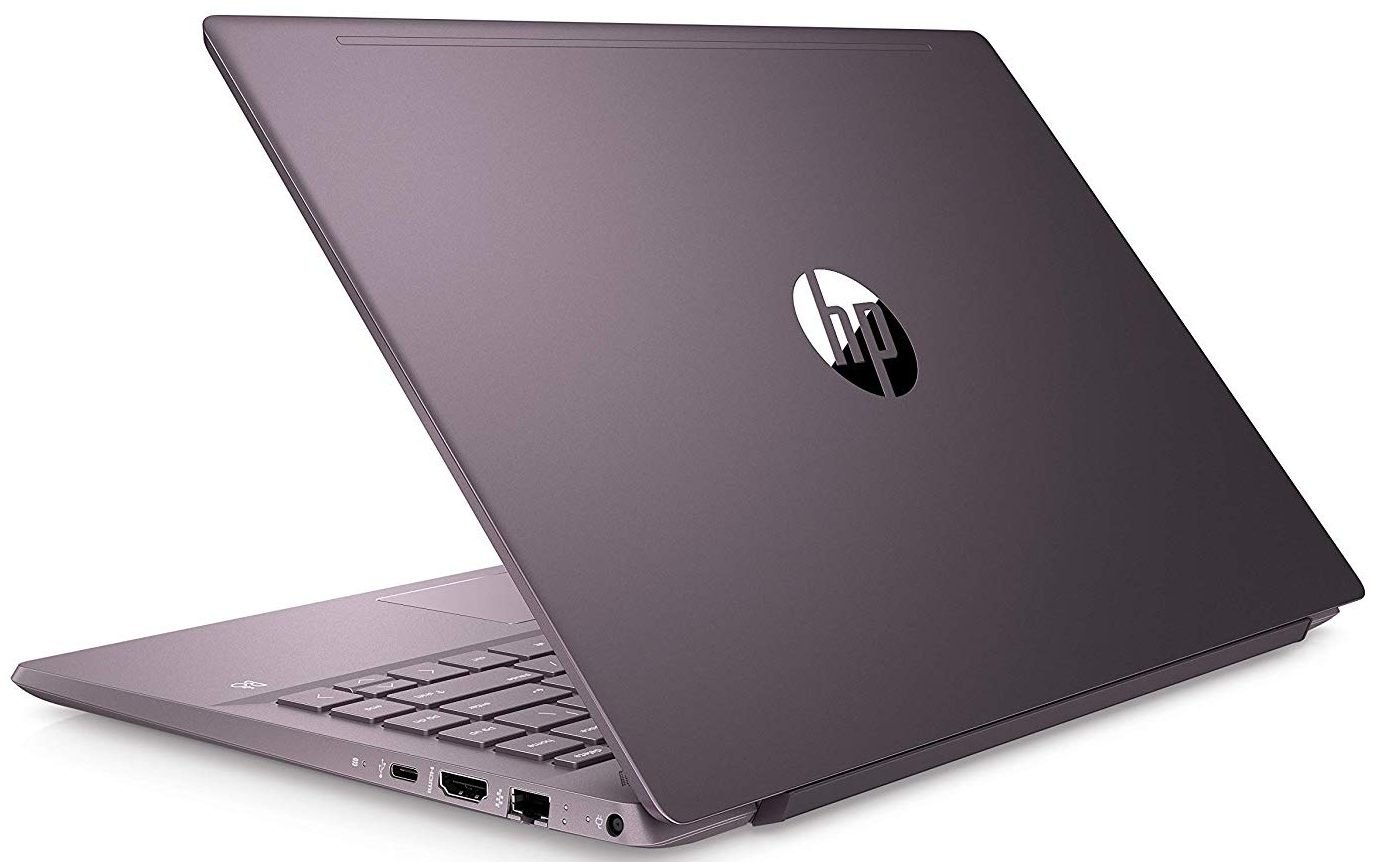
One area where the HP Pavilion 14 ce0523sa excels is port selection. Unlike many modern ultrabooks that force you to use dongles, HP provides a robust set of legacy and modern ports on both sides.
Left Side
-
USB 3.1 Gen 1 Type-A (x1): For older peripherals like mice or USB drives. Supports sleep-and-charge, meaning you can charge your phone even when the laptop is off.
-
HDMI 1.4b: Connect to an external monitor or projector. Supports 1080p at 60Hz.
-
USB 3.1 Type-C (x1): This is not Thunderbolt 3, but it supports data transfer (up to 5Gbps), display output (DisplayPort 1.2), and power delivery. You can charge the laptop via this port or output to a USB-C monitor.
-
AC Power Connector: The traditional barrel plug.
Right Side
-
USB 3.1 Gen 1 Type-A (x1)
-
SD Card Reader (Full-size): Excellent for photographers to transfer photos from a camera.
-
Headphone/Microphone Combo Jack (3.5mm)
-
Kensington Lock Slot: For physical security in public places.