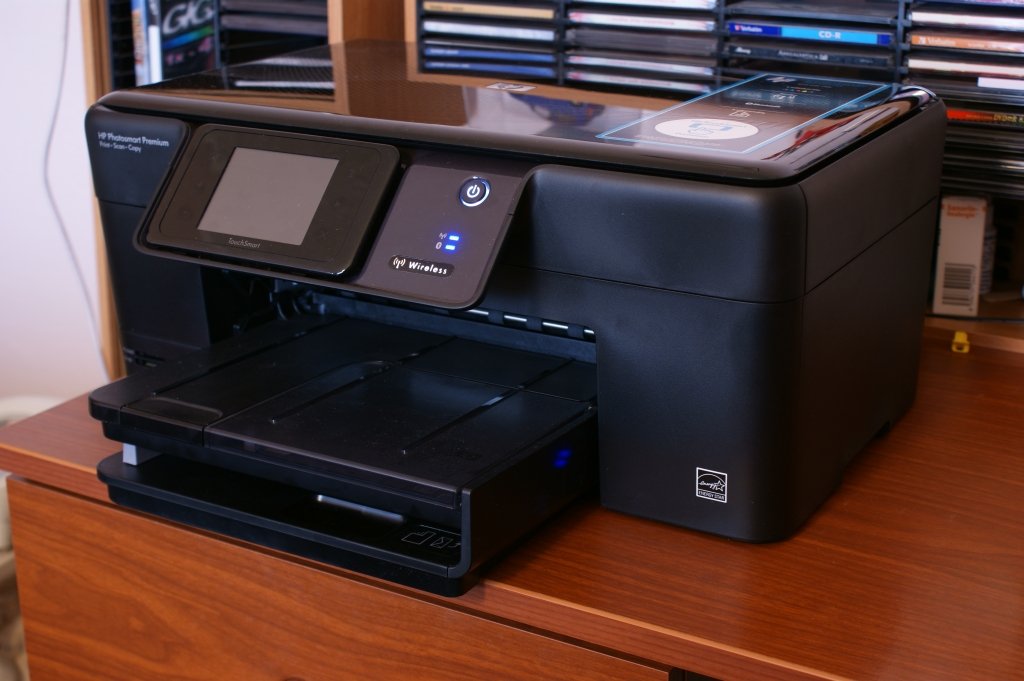
The evolution of home printing and digital photography is a story filled with technological leaps, and few product lines capture this journey quite like the HP Photosmart series. For over a decade, the name represented a bridge between the digital world and the physical keepsake. It began as a pioneering line of digital cameras and grew into a comprehensive ecosystem of all-in-one printers that brought photo labs into living rooms. Although the brand has largely been retired and replaced by the HP Envy and HP Tango lines, the legacy of the HP Photosmart persists in millions of homes and offices.
Understanding the significance of HP Photosmart requires looking beyond just hardware specifications. It is about recognizing how this product line democratized photo printing. Before the rise of this series, printing high-quality photographs at home was often a frustrating and expensive endeavor. The HP Photosmart changed this by integrating user-friendly interfaces, advanced ink systems, and later, wireless connectivity that made printing seamless. For owners of these devices, the name HP Photosmart invokes memories of specific models, from the compact C-series to the feature-rich premium all-in-ones.
This comprehensive article explores the complete narrative of the HP Photosmart line. We will explore its origins as a digital camera brand, its golden age as the dominant force in home photo printing, and the practical realities of keeping these devices operational today. Whether you are researching a vintage digital camera, trying to troubleshoot a persistent error on an old printer, or simply curious about a major chapter in consumer technology history, this guide provides extensive detail. The story of the HP Photosmart is not just about ink and paper; it is about the universal desire to capture, preserve, and share moments in tangible form.
The Origins: A Vision for Digital Photography
The story of the HP Photosmart does not begin with printers. It begins in the late 1990s with the advent of consumer digital photography. Hewlett-Packard, traditionally known for test equipment and computing, entered the imaging market with a distinct vision. The very first device to carry the Photosmart badge was not a printer, but a digital camera. This early camera, simply called the HP Photosmart, was a VGA-resolution device that utilized Intel Miniature Card-based storage. While primitive by modern standards, this device established a design philosophy that HP would follow for years: integration .
This phase of the brand’s history is often forgotten. Many people only associate the HP Photosmart name with printers. However, HP was a major player in the early digital camera market. They quickly broadened their lineup with several distinct series, each targeting a different segment of the market. These included the basic E-series, the versatile M-series, and the premium R-series. Each series pushed the boundaries of megapixel counts and compact design. For instance, the R-series represented the top line, featuring higher-resolution sensors and advanced video capabilities, such as the R927 which offered VGA video recording .
The Camera Series Breakdown
To fully appreciate the brand’s scope, it is essential to understand the diversity of its camera offerings. The naming conventions, while complex, indicated distinct tiers and features.
The C-series was one of the earliest professional-looking lines. Models like the HP PhotoSmart C30 and C200 were actually based on hardware partnerships, such as those with Konica . This allowed HP to enter the market quickly. The C-series evolved into models like the C618, which was identical to the Pentax EI-200, showcasing the collaborative nature of the electronics industry at the time. These cameras typically offered better optics and more manual controls compared to the later mass-market point-and-shoot models.
The E-series was designed for the everyday consumer. Models like the HP Photosmart E217 and E317 were ultracompact and easy to use. With screens starting at just 1.5 inches, they were designed for simplicity . The M-series continued this trend, with models like the M425 and M525 offering higher megapixel counts and SD card support, powered by standard AA batteries for convenience. These were the cameras that saturated the market and made digital photography accessible to families who wanted to take snapshots without technical complexity.
The R-series was where HP flexed its technological muscle. These cameras featured superior build quality and advanced shooting modes. The HP Photosmart R927, for example, was a standout model that offered video recording capabilities far beyond its competitors at the time. This segmentation strategy—basic, mid-range, and high-end—proved highly successful. It allowed HP to compete across the entire retail spectrum. However, the camera division was not destined to last. On November 7, 2007, HP announced it was seeking an alternative business model for its cameras, effectively signaling the end of the road for the standalone HP Photosmart camera line . The focus was shifting entirely to printing.
Transition to a Printing Powerhouse
While HP stopped designing its own cameras, the Photosmart brand was far from dead. It pivoted decisively to what happened after the photo was taken: the print. This transition marked the beginning of the brand’s most iconic era. The name HP Photosmart became synonymous with high-quality home photo printing. The strategy was encapsulated in HP’s “Print 2.0” vision, a strategy unveiled around 2007 that aimed to make printing easier from the web and digital content creation platforms .
This era introduced a new naming convention that moved beyond simple camera series into a robust ecosystem of printers. The “A” series stood for compact photo printers, the “C” and “D” series for all-in-one and single-function inkjets, and eventually, the “B” series for connected e-All-in-One devices. The release cadence during this period was rapid. In August 2007 alone, HP introduced five compact photo printers and five Photosmart single-function and all-in-one printers .
One of the most significant innovations during this period was the introduction of touchscreen technology. The HP Photosmart A826 Home Photo Center featured a massive 7.0-inch color touchscreen, virtually unheard of at the time. This allowed users to edit, crop, and add captions directly on the printer without needing a computer . The A626 offered similar functionality with a built-in handle and optional battery, making it a portable photo lab. These devices were designed to produce lab-quality, smudge-resistant photos that could last for generations. This shift from a pure hardware spec race to a user-experience focus defined the success of the HP Photosmart printer line.
The All-in-One printers also gained sophisticated features. The HP Photosmart C8180, for example, wasn’t just a printer; it was a creative hub. It featured a 3.5-inch touchscreen, built-in wireless networking, and LightScribe technology, which allowed users to etch labels directly onto CDs and DVDs . The integration of these features demonstrated that HP understood the evolving digital home. People were not just printing photos; they were managing digital archives, creating personalized projects, and demanding seamless connectivity. The fact that a high-end model like the C8180 launched at a premium price showed that consumers were willing to invest in quality.
Connectivity and the e-All-in-One Revolution
As home networks became standard, the requirements for a printer changed. It was no longer enough to be a peripheral tethered to a single computer. The HP Photosmart line adapted elegantly to this new reality with the introduction of the “e-All-in-One” series, such as the B210e. This generation of printers was defined by its connectivity options, which included Wi-Fi, wireless direct printing, and cloud-based services .
The setup process for these devices, while advanced for the time, required careful navigation of network protocols. Printers like the HP Photosmart 5520 series offered multiple ways to get online. Users could connect wirelessly using WiFi Protected Setup (WPS), a standard that allowed for a connection at the push of a button on a compatible router. If the router didn’t support WPS, a standard Wireless Setup Wizard guided users through entering their SSID and WEP or WPA passphrases . The resolution of wireless printing introduced a new set of variables—signal strength, encryption types, and IP addresses—that were novel to the average printer owner.
One of the most liberating features was “Wireless Direct.” This allowed Wi-Fi devices, such as laptops or smartphones, to connect directly to the HP Photosmart printer without needing a traditional wireless router at all. The printer effectively created its own local Wi-Fi network (with an SSID like HP-print-xx-Photosmart-5520). This was a boon for travelers or those in environments without a stable infrastructure network. However, HP documentation warned that using this feature meant users could not access the Internet simultaneously through that connection, highlighting the trade-offs of early wireless implementations .
The software ecosystem expanded alongside the hardware. The HP ePrint platform was a groundbreaking feature that allowed users to send prints from anywhere in the world by simply emailing the document to their printer’s unique email address. This was complemented by “Print Apps,” which integrated with online services directly on the printer’s touchscreen, bypassing the computer entirely. These connectivity features transformed the HP Photosmart from a mere output device into a connected hub, a concept that was radical at the time but is standard across the industry today.
Navigating Common Technical Challenges
Despite their advanced features, longevity brought familiar issues to the HP Photosmart line. Operating a legacy printer requires patience and troubleshooting skills. The complexity of these devices, combining mechanical paper feeds with sensitive electronic ink systems, meant that errors were inevitable. For current owners, understanding these issues is key to keeping the devices operational.
Ink System Obstacles
The most persistent complaints from HP Photosmart printer users, particularly on models like the C4580, involve ink cartridges. The dreaded “Print cartridge(s) missing or not detected” error can suddenly halt a print job even when cartridges appear to be properly installed . This error is rarely solved by simply cleaning the contacts. Often, the failure stems from a corrupted data connection between the printer’s firmware and the cartridge chip. The recommended path involves a systematic approach: first running the integrated HP diagnostic tools, then checking for specific error patterns that might indicate a hardware failure in the print carriage itself. In many documented cases, users found that removing the power cord and letting the printer reset completely—draining residual power—resolved more logic errors than the software troubleshooter did.
Another challenge is the “Ink System Failure” or “System Supply Problem” message. This is a more critical error that suggests a problem with the printhead or the ink delivery mechanism, not just the cartridges. The HP Photosmart series, like the 5520 and 6520 models, often uses a separate printhead that can wear out or clog over time, independent of the ink tanks . Users are often forced to decide whether to invest in expensive replacement parts for an aging printer or retire the device. The cost of replacement cartridges for older models also becomes a factor, as maintaining a four-color independent ink system (like the HP 178 or HP 564 cartridges) can exceed the value of the printer itself .
Network and Software Hiccups
Wireless connectivity, while transformative, is another source of frustration. The HP Photosmart 5520 and similar e-All-in-One models were designed for the wireless standards of their time, primarily 802.11b/g/n on the 2.4GHz band . In modern homes saturated with dual-band routers, smart home devices, and overlapping signals, these older printers often drop connections. The “Printer is offline” error is a frequent symptom, often requiring users to navigate the printer’s touchscreen to restore Wi-Fi setup mode or re-run the Wireless Setup Wizard. HP’s conversion tool was designed to move a printer from a USB connection to a wireless one, but sometimes, reversing that process and sticking to a wired USB connection proves the most stable solution for these older devices .
Paper handling also presents problems. The “Out of Paper” message on models like the B210e, even when paper is loaded, usually points to worn pickup rollers or a dirty paper sensor . The mechanical grinding noise that some aging Photosmart printers make is also a classic sign of a carriage jam or a failing gear assembly. HP’s support documents remain a valuable resource, offering specific fixes like cleaning the scanner glass to resolve copy quality issues and alignment procedures to fix blurry output. The diagnostics tools built into the printer firmware, though dated, are often the first line of defense against these mechanical failures .
The Photo Printing Experience: Quality and Cost
During its peak, the HP Photosmart line was celebrated for its output quality, especially for photographs. Comparing models like the HP Photosmart 5525 to later lines like the Envy 4500 reveals the Photosmart’s true strengths. The 5525, a four-cartridge system, consistently scored higher in photo quality assessments, delivering richer color accuracy and finer detail on photo paper . This was a direct result of the specialized ink formulations designed to reproduce a wider color gamut for borderless lab-quality prints.
The print resolution, standardized at 4800 x 1200 optimized dpi across many models, was only part of the story . The real advantage was in the media handling and the print modes. A dedicated HP Photosmart printer allowed for fine control over paper type, and the inclusion of an SD card slot or Memory Stick slot on many devices allowed for direct printing from a camera card without a PC. The speed, while not groundbreaking by modern laser standards, was respectable for an inkjet, with some models achieving around 11 pages per minute in draft black and around 8 pages per minute in color .
However, the cost of this quality was a subject of continuous debate. Ink cost per page is a critical metric. While the four-cartridge system of the HP Photosmart reduced waste because you only replaced the color that ran out, standard cartridges yielded relatively few pages. A standard black cartridge might be rated for 250 pages, while high-capacity XL cartridges could push that to 550 pages . The price of a set of high-capacity cartridges could easily exceed the cost of a budget printer. This business model—selling the hardware at a low margin and recouping profit on consumables—was standard industry practice but a known pain point for users. The integrated printhead systems also meant that if the printhead failed, the cost of replacement often signaled the end of the device’s useful life.
Practical Maintenance and Support for Legacy Devices
For users still relying on an HP Photosmart, proper maintenance is not just about fixing problems; it’s about preventing them. Inkjet printers left idle for long periods are prone to clogged nozzles. Running a weekly test page or cleaning cycle prevents the ink from drying in the printhead. Paper storage is also critical; high humidity can cause pages to stick together or curl, leading to “Paper Mismatch” or jam errors . Loading the correct paper type and calibrating the printer for that stock through the driver settings ensures consistent results.
Accessing HP’s support infrastructure for these older products is still possible, though the experience has changed. HP’s website provides product-specific home pages, like the one for the HP Photosmart 7760, that collate relevant documents, drivers, and troubleshooting guides . The company also maintains a robust diagnostics section and a virtual assistant to guide users through common problems . When Microsoft’s community forums field questions about a C4580 error, the consistent advice is to route users back to HP’s specific diagnostic tools, emphasizing that cartridge detection problems are often a firmware-hardware interaction rather than a Windows printing stack issue .
For those who need to replace parts, HP SureSupply remains the official channel to check cartridge compatibility. Cross-referencing regional cartridge codes—like the HP 564 for the Americas versus the HP 364 for Western Europe—is essential to avoid purchasing unusable supplies . Users should also be cautious of counterfeit or refilled cartridges, as a “Used, Refilled, or Counterfeit ink cartridge” warning can lock the printer . The internal diagnostics, often accessed through a hidden service menu or via the touchscreen settings, can provide error logs and sensor status that help advanced users pinpoint whether a failure is in the print carriage motor, the paper feed assembly, or the ink supply system.
A Comparison Across the Generations
To truly understand the HP Photosmart line, it helps to chart the evolution of its specifications. The following table compares four distinct phases of the product family, highlighting the shift from standalone cameras to connected all-in-one printers.
| Feature | C-Series Cameras (Late 1990s) | A-Series Printers (2007) | e-All-in-One B210e (2010s) | Photosmart 5525 (2012-2013) |
|---|---|---|---|---|
| Primary Function | Digital Photography | Compact Photo Printing | Multifunction Print/Scan/Copy | Multifunction with ePrint |
| Key Feature | Konica-based hardware | Large Touchscreen Display | Web Apps, ePrint | Color Touchscreen, Auto Duplex |
| Resolution / MP | VGA to 2.1 MP | 4800 x 1200 dpi (print) | 4800 x 1200 dpi (print) | 4800 x 1200 dpi (print) |
| Connectivity | Serial / USB | USB, PictBridge | Wi-Fi, Wireless Direct | Wi-Fi, Wireless Direct, ePrint |
| Ink System | N/A | Tri-color cartridge | 4 Individual Ink Cartridges | 4 Individual Ink Cartridges (HP 178) |
| Display Size | 1.8″ LCD | 7.0″ Touchscreen | Monochrome Graphic Display | 2.65″ Color Touchscreen |
This table illustrates the dramatic pivot in HP’s strategy. The early cameras like the HP PhotoSmart C30 were rebranded Konica models that captured VGA images. A decade later, the A826 printer turned the brand into a standalone creative studio with a 7-inch screen. The e-All-in-One era prioritized connectivity over physical interface size, using the smartphone as the primary screen. Finally, models like the 5525 found a balance, offering a color touchscreen interface alongside robust cloud-printing capabilities, all while keeping the cost accessible.
The Enduring Community and Environmental Considerations
Despite the fact that HP has not released a new HP Photosmart model in years, a large secondary market and user community persist. Online forums, local classifieds, and community tech support threads are filled with activity regarding these printers. The reason for this sustained interest is multifaceted. Many users believe that older printers, particularly higher-end Photosmart models, were built with more durable internal components than today’s entry-level offerings. The ability to use third-party or refillable ink cartridges in some models makes them attractive from a cost perspective, although this path carries risks.
This longevity also brings up issues of electronic waste and sustainability. The debate over whether to repair or replace an HP Photosmart often hinges on an environmental calculus. Keeping a device out of a landfill for as long as possible is a worthwhile goal. However, older printers often lack the energy-efficient sleep modes of modern devices. The continued manufacture and shipping of plastic ink cartridges for these legacy devices also have an environmental footprint. HP’s own cartridge recycling programs, which have been active for decades, provide a closed-loop solution for the plastic, but the energy equation for powering an aging, always-on Wi-Fi printer from 2009 is different from that of a modern, low-energy equivalent.
For collectors and hobbyists, the early digital cameras in the Photosmart line represent a fascinating period of technological history. Finding a working HP Photosmart 618 or an R927 is a niche pursuit. These devices, often overlooked in favor of more iconic camera brands, capture a specific moment before smartphones absorbed the entire compact camera market. The C-series hybrids, which blended Pentax and Konica engineering with HP branding, are particularly interesting artifacts of the tech industry’s collaborative age.
Conclusion: The Lasting Impression of HP Photosmart
The HP Photosmart story is a mirror reflecting the seismic shifts in consumer technology over two decades. It began with the ambition to digitize memories, producing some of the first mainstream digital cameras that families used to capture life’s moments. As the industry evolved and the need for physical prints remained strong, the brand pivoted seamlessly to become a leader in home photo printing. The printers that bore the name transformed from simple output devices into sophisticated, connected hubs that predated the smart home era.
While the name HP Photosmart has faded from the shelves of electronics stores, replaced by newer lines like Envy and Tango, its DNA is present in every modern all-in-one printer. The concepts of the touchscreen interface, wireless direct printing, and cloud-connected apps were all refined and popularized during the Photosmart years. For the millions of users who still depend on a Photosmart printer to create greeting cards, print homework, or finally get those digital photos off a USB drive and onto paper, the line represents a rare combination of build quality, feature richness, and lasting value.